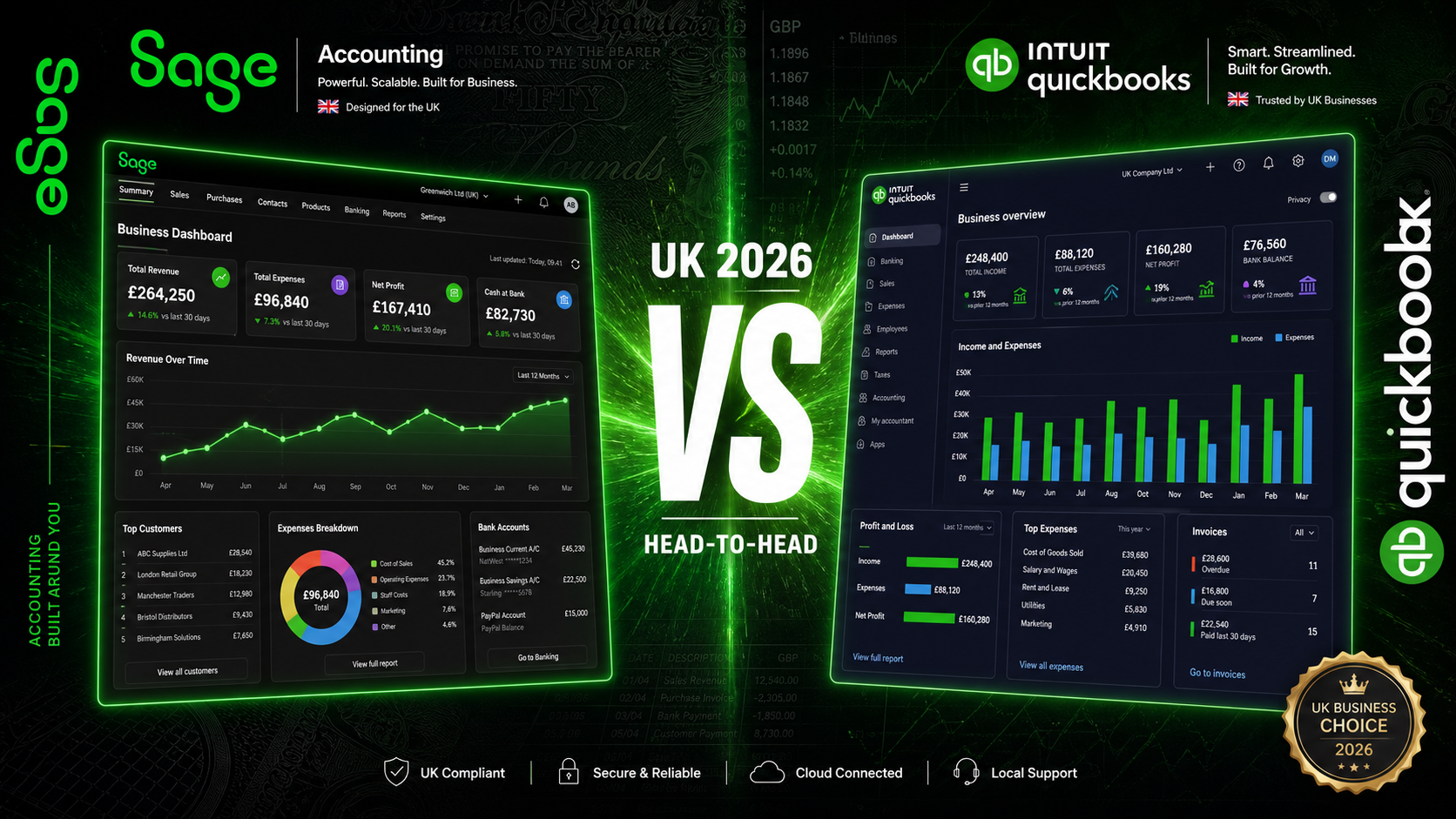
Sage and QuickBooks are the two most widely installed cloud accounting platforms among UK small businesses — and both have spent the past two years investing heavily in AI, MTD compliance, and payroll automation. Both are HMRC-recognised for Making Tax Digital, both handle VAT returns and bank feeds, and both claim to reduce the time you spend on bookkeeping. But they are built on genuinely different product philosophies, priced differently, and suited to different types of business.
The comparison that matters is not a feature checklist. It is what the all-in monthly cost looks like once payroll is added, what the support structure looks like when something goes wrong under a deadline, and which platform is built for the specific way UK businesses actually operate. This guide works through each of those questions directly.
Pricing
Both platforms use tiered monthly subscription pricing, but their structures diverge in ways that are not immediately obvious from the headline numbers. The most consequential difference is payroll. Sage bundles it into its mid-tier plan at a fixed rate. QuickBooks offers payroll only as a paid add-on, charged on top of the base plan fee, with a per-employee component.
Platform & Plan | Monthly (excl. VAT) | Payroll | Key Features |
|---|---|---|---|
Sage Free (Sole Trader) | £0 | Not included | Income, expenses, invoicing, MTD for ITSA, Copilot AI |
Sage Start | £18 | Not included | Bank feeds, VAT returns, MTD, Copilot AI, unlimited invoices |
Sage Standard | £39 | Included — no per-employee cost | Full payroll, CIS, cash flow forecasting, advanced reports |
Sage Plus | £59 | Included — no per-employee cost | Multi-currency, inventory, budgets, unlimited users |
QuickBooks Sole Trader Plus | £10 | Add-on only | MTD for ITSA, receipt capture, mileage tracking, 1 user |
QuickBooks Simple Start | £15 | Add-on only | MTD for VAT, bank feeds, invoicing, 1 user |
QuickBooks Essentials | £28 | Add-on only | Multi-currency, time tracking, bill management, 3 users |
QuickBooks Plus | £38 | Add-on only | Inventory, project tracking, budgeting, class tracking, 5 users |
QuickBooks Advanced | £90 | Add-on only | Custom reports, workflow automation, Excel sync, 25 users |
At the entry level, QuickBooks looks cheaper. £10 per month for the Sole Trader Plus plan undercuts Sage's £18 Start tier by a meaningful margin. But that comparison collapses the moment payroll enters the picture. A business on Sage Standard pays £39 per month regardless of headcount. A business on QuickBooks Essentials adding the payroll add-on pays the base fee plus a per-employee charge on top — and that cost compounds as the team grows. At ten employees, Sage's flat-rate structure saves a material amount annually. At twenty-five, the saving is wider still. The gap is structural rather than incidental.
QuickBooks also has no free plan. Sage's free Sole Trader tier includes MTD for Income Tax Self Assessment, Copilot AI, and invoicing at no cost — features that QuickBooks gates behind paid tiers. For sole traders comparing entry points, the gap runs in Sage's favour even before a single feature comparison is made.
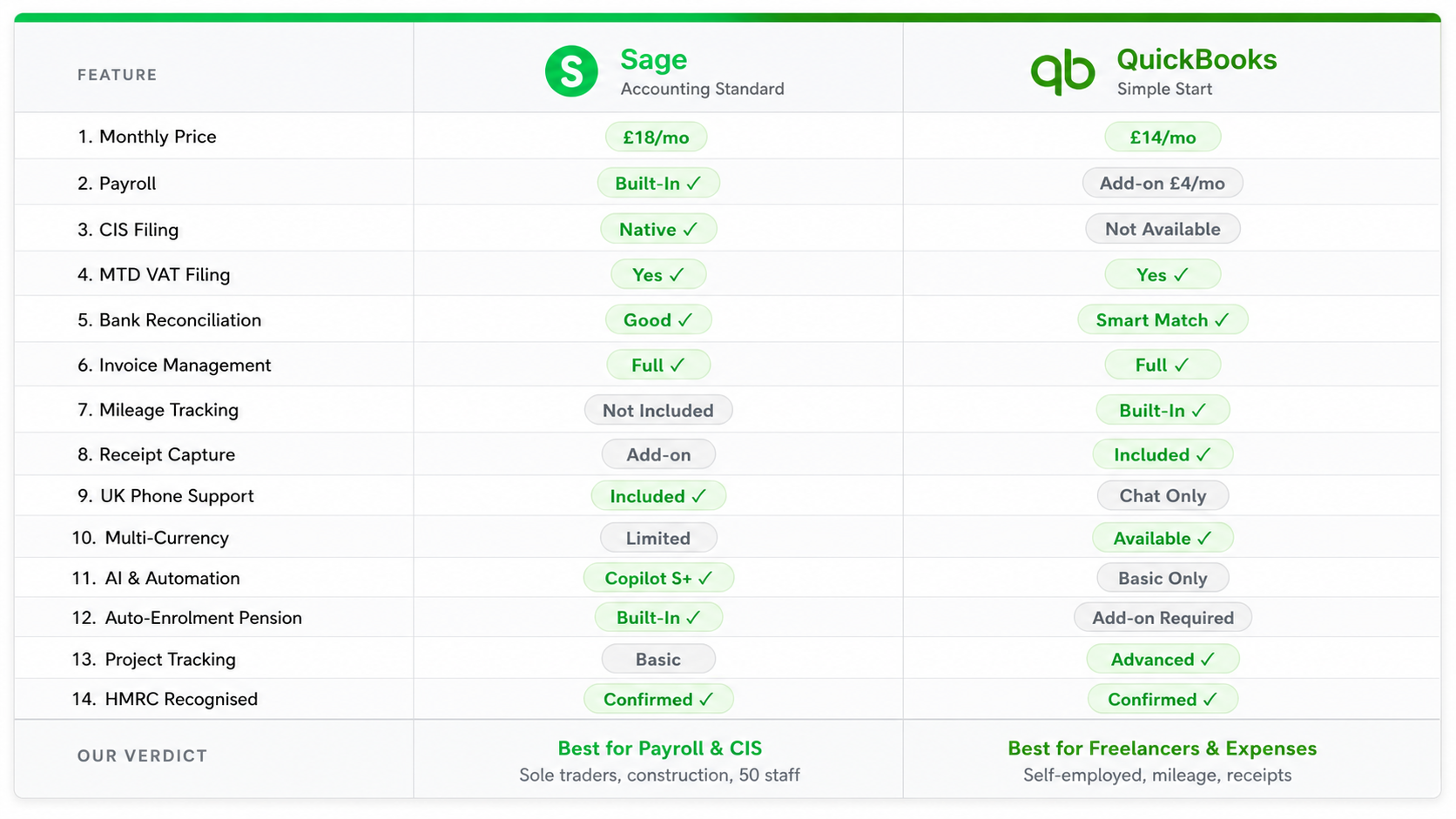
On equivalent feature sets with payroll included, Sage is cheaper at every employee count. The more staff you have, the wider the gap becomes — because Sage's price is fixed while QuickBooks' rises with each hire.
Payroll
For any UK business with employees, payroll is where the practical difference between these two platforms is most significant — not just in cost, but in how each product is architecturally structured around it.
Sage treats payroll as part of the core product. On the Standard and Plus plans it is fully integrated — RTI submissions to HMRC, statutory payments (SSP, SMP, SPP), auto-enrolment with NEST, NOW:Pensions, The People's Pension, and Smart Pension, automatic tax code updates, and digital payslips. All of it sits inside the same interface as your accounts. There is no separate login, no data sync to manage, no additional monthly line on your invoice.
QuickBooks offers payroll as a paid add-on that connects to the accounting software. For businesses with straightforward payroll needs and an experienced bookkeeper managing the reconciliation, this is workable. For a business owner handling everything themselves, the workflow is split — you run payroll in one environment and reconcile journal entries in another. The friction is real, and it multiplies during busy periods.
Pension provider breadth is more consequential than most comparison articles acknowledge. Sage connects natively to four of the UK's major workplace pension providers: NEST, NOW:Pensions, The People's Pension, and Smart Pension. QuickBooks' payroll add-on supports NEST as its primary integration. If your business already has an auto-enrolment scheme with The People's Pension or NOW:Pensions, Sage's native connections mean pension contributions are calculated and submitted without manual intervention or workaround. That does not show up in a feature table, but it matters every pay cycle.
For construction businesses, CIS is the deciding factor. Sage Standard handles CIS deductions, monthly returns to HMRC, and contractor and subcontractor statements natively inside the same payroll workflow. QuickBooks does include CIS tools — it calculates and submits CIS amounts from the Essentials plan upward — but Sage's implementation is more deeply embedded in the payroll and accounts workflow. For high-volume construction subcontractors, the difference in execution is felt in the time spent at month-end.
VAT and Making Tax Digital
Both platforms are fully HMRC-recognised for Making Tax Digital for VAT, and both handle direct submission reliably. For MTD for VAT purposes, neither platform has a meaningful advantage over the other — both work, both are accurate, and both allow you to review individual return boxes before submitting.
The divergence is with MTD for Income Tax Self Assessment, which became mandatory for sole traders and landlords above the relevant income threshold from April 2026. Sage built what it describes as the UK's first autonomous MTD AI Agent — a tool that prepares and submits quarterly income updates to HMRC with minimal manual intervention, integrated into Sage Copilot. The underlying point holds regardless of how that description is framed: Sage has invested more heavily in ITSA automation than QuickBooks has at equivalent price points.
QuickBooks does support MTD for Income Tax — it is included in the Sole Trader Plus plan at £10 per month, which is cheaper than Sage's equivalent for sole traders without employees. The practical difference is in how automated that compliance workflow is. QuickBooks' MTD for ITSA tools are competent; Sage's are more proactively managed by Copilot. For a sole trader who wants the software to handle more of the compliance work autonomously, Sage has the edge here. For a sole trader who wants the cheapest entry point and is comfortable managing their own quarterly updates, QuickBooks Sole Trader Plus at £10 is difficult to argue against.
Bank Reconciliation
Bank reconciliation quality matters more than most people appreciate when choosing accounting software, because it determines how much time you spend on the platform each week. A reconciliation workflow that is two minutes faster per session is five hours saved over a year — compounded across a business's lifespan, that is genuinely material.
QuickBooks has one of the strongest reconciliation workflows in the UK market. Its bank feeds connect reliably across major UK banks and challenger banks via Open Banking. The AI categorisation — marketed as Intuit Intelligence — learns transaction patterns accurately and improves with use. The interface is clean, and the automated bookkeeping feature matches and records recurring transactions without requiring manual review each time. For accountants or bookkeepers processing large transaction volumes daily, QuickBooks' reconciliation workflow is fast and well-executed.
Sage has closed the gap substantially with Copilot. Bank feeds connect to all major UK banks, and Sage Copilot now surfaces AI-powered matching suggestions and flags unusual transactions proactively. Sage also includes an anomaly detection function that surfaces discrepancies in P&L and balance sheets before they become filing problems. For a business owner reconciling their own books a few times per week, the practical difference between Sage and QuickBooks here is not the reason to choose one over the other. It becomes relevant at scale — for high-volume bookkeeping practices or businesses processing hundreds of transactions weekly.
Invoicing
Both platforms handle invoicing competently. The practical differences come down to Sage's AI-powered payment chasing, QuickBooks' more flexible invoice templates, and a meaningful difference in how the two platforms handle recurring and batch billing.
QuickBooks' invoice templates offer solid customisation — logos, custom fields, and a clean layout that works well for professional service businesses billing clients on presentation-sensitive engagements. QuickBooks also supports recurring invoices at every paid tier, which is straightforward to configure. Batch invoicing is available on the Advanced plan, which at £90 per month is a significant step up for most small businesses who need it.
Sage's counterpoint is Copilot-powered invoice chasing. Rather than sending generic payment reminder templates at fixed intervals, Sage Copilot monitors outstanding invoices and drafts context-aware follow-up messages that account for the invoice age and the customer's payment history. It does not require manual configuration of reminder sequences. For a business with a persistent late payment problem — and in the UK, that is most small businesses — automating intelligent chasing without configuration overhead has more practical value than template flexibility. Sage also imposes no invoice volume cap on any paid plan, including the £18 Start tier. QuickBooks has no volume cap either across its plans, which removes a friction point that exists in some competing platforms.
AI
AI is the area where both platforms are investing most heavily in 2026, and also the area where marketing language diverges most sharply from what the software actually does. It is worth being specific about each.
QuickBooks brands its AI suite as Intuit Intelligence. It includes AI-powered bank feed categorisation, VAT AI for pre-submission error checks, anomaly detection in P&L and balance sheets, a Customer AI for lead management and follow-ups, a Finance AI for KPI analysis and scenario planning, and a chat interface for querying your accounts in plain language. These are live features at varying plan levels — not all are available on entry tiers. The AI categorisation is fast, accurate, and genuinely useful for reducing manual reconciliation time.
Sage Copilot does more than surface insights — it takes action. It monitors overdue invoices and chases them. It flags anomalies proactively. It prepares quarterly MTD ITSA submissions autonomously. It is included free on every Sage plan, including the free Sole Trader tier. QuickBooks' equivalent analytical depth — particularly Finance AI and the full Intuit Intelligence suite — requires higher plan tiers. The design philosophy is different: QuickBooks' AI informs and assists; Sage's AI acts. For time-pressed business owners who want the software to do more of the work without their involvement, that distinction matters.
Reporting
QuickBooks' reporting is clean, well-designed, and consistently rated highly by accountants for clarity. Profit and loss, balance sheet, cash flow statement, and aged debtors reports are all clearly presented and easy to export or share with an external accountant. The Plus plan adds project profitability reporting, and the Advanced plan introduces a custom report builder with Excel sync — a genuinely useful feature for businesses that need tailored financial output without a separate BI tool.
Sage offers analytical depth at lower plan tiers. Its analysis types — which let you tag transactions by department, location, project, or custom dimensions and filter every core report by those tags — are available from the Standard plan at £39 per month. Budget versus actual variance reporting is on Plus. For businesses that need departmental P&L or cost-centre analysis without paying for a higher accounting tier, Sage's reporting structure is more accessible. QuickBooks requires the Plus plan at £38 or the Advanced plan at £90 for equivalent segmented reporting.
Neither platform replaces a dedicated management reporting tool for complex organisations. For the majority of UK small businesses, both serve well. The choice on reporting grounds comes down to whether polished, easy-to-share output or deeper segmented analysis at a lower tier matters more.
Integrations
QuickBooks has one of the larger third-party integration ecosystems of any UK accounting platform. Hundreds of apps connect natively — e-commerce tools including Shopify and WooCommerce, CRM platforms, inventory management systems, payment processors, and specialist vertical software. The QuickBooks ecosystem is mature and well-documented. For businesses that have already built workflows around specific SaaS tools and need reliable two-way data sync, QuickBooks is a well-tested foundation.
Sage's integration library is smaller, but the argument for it is different. Sage builds more functionality natively rather than relying on third-party connectors. Payroll, CIS, inventory management, cash flow forecasting, and pension auto-enrolment are all part of the core product on the right plan. A business that needs those capabilities does not need to add, manage, and pay for separate integrations. If your operations require a wide ecosystem of connected tools, QuickBooks is the stronger platform. If the capabilities you need are already bundled into Sage's plans, its integrated approach is simpler and often more cost-effective.
Mobile
QuickBooks has a strong mobile app. Invoice creation, bank transaction categorisation, receipt capture via OCR, automatic mileage tracking, and cash flow visibility are all well-implemented on mobile. The Intuit Intelligence chat feature works on mobile, allowing you to query your accounts in plain language from your phone. For business owners who are rarely at a desk — tradespeople, consultants, or field-based professionals — the QuickBooks app functions as a near-complete accounting tool and is consistently rated above 4.5 stars on both iOS and Android.
Sage's mobile app covers the core tasks reliably. Invoices, expenses, cash flow, and Copilot access are all available. The app is stable and functional. It is not at the same level of depth or polish as QuickBooks on mobile. If the phone is where you do most of your accounting, that difference matters. If mobile is a secondary touchpoint alongside a desktop workflow, the gap is less relevant.
Support
This is the most consequential practical difference between the two platforms, and it deserves direct treatment. Sage offers UK phone support on all paid plans. QuickBooks also offers phone support — 8am to 7pm Monday to Friday and 8am to 6pm Saturday to Sunday — along with live message support extended to 10pm on weekdays. On pure support channel breadth, QuickBooks' seven-day phone access is actually more extensive than many UK accounting platforms offer.
Both platforms have extensive knowledge bases, live chat, and email support. Both have partner networks of accountants and bookkeepers who can provide hands-on assistance. Sage's UK-specific support has a reputation for being responsive on payroll and CIS queries, which matter most to the construction and employer segments where Sage is strongest. QuickBooks' support is broadly rated well by small businesses, particularly for VAT and MTD queries. Neither platform has a meaningful support disadvantage relative to the other in 2026 — the distinction that existed when QuickBooks was phone-only in some markets no longer applies in the UK context.
Who Each Platform Is Best For
Choose Sage if
You employ staff and want payroll included without a per-employee cost at a fixed monthly price
You work in UK construction and need integrated CIS deductions and HMRC returns inside the core payroll workflow
You are a sole trader who wants a free plan that covers MTD for Income Tax with AI-assisted submission
You use a workplace pension other than NEST — NOW:Pensions, The People's Pension, or Smart Pension
You want AI that acts autonomously on invoices, anomalies, and compliance submissions rather than surfacing insights for you to act on
You need departmental or cost-centre analysis at the Standard plan level without upgrading to a premium tier
Choose QuickBooks if
You are a sole trader or freelancer without employees who wants the cheapest MTD-compliant entry point at £10 per month
You run an e-commerce business and need deep, reliable Shopify or WooCommerce integration
You need to connect your accounting software to a wide range of third-party tools across a mature app ecosystem
You process high transaction volumes and want a fast, AI-assisted reconciliation workflow that learns your patterns
You need project profitability tracking, budgeting, and class/location tracking within a single mid-tier plan
Your accountant already uses QuickBooks and you want seamless collaboration without a platform migration
You want seven-day phone and live chat support including weekend access
The Bottom Line
For sole traders with no employees, the entry-level comparison actually runs slightly in QuickBooks' favour on price. £10 per month for Sole Trader Plus with MTD for Income Tax is cheaper than Sage's £18 Start tier. Sage's free plan covers the same MTD compliance ground at no cost, which changes that comparison for those who qualify — but for a sole trader who wants a paid, full-featured plan, QuickBooks is the cheaper starting point.
For businesses with employees, the calculation reverses sharply. Sage Standard at £39 per month includes full payroll at a flat rate regardless of headcount. QuickBooks at any comparable tier does not — once you add the payroll add-on and its per-employee component, the monthly cost exceeds Sage at almost any team size. The gap does not narrow as you grow. It widens. For businesses in construction that need integrated CIS, Sage's advantage on this specific dimension is decisive.
QuickBooks' strengths — its AI depth across the Intuit Intelligence suite, its mobile app quality, its integration ecosystem, and its seven-day phone support — are genuine and matter to specific businesses. For a freelance consultant, an e-commerce brand with a dedicated accountant, or a business that has built its tech stack around QuickBooks integrations, the platform is a well-justified choice. Its weaknesses are specific and knowable.
For the broader population of UK small businesses — businesses that employ people, operate in construction under CIS, want payroll bundled at a fixed price, and need their AI to take action rather than surface recommendations — Sage is the more complete and cost-effective platform in 2026. The payroll integration is structurally meaningful, the Copilot AI is genuinely autonomous, and the fixed pricing becomes more advantageous the more people you employ.